ENC 5.0.4.875
Win10
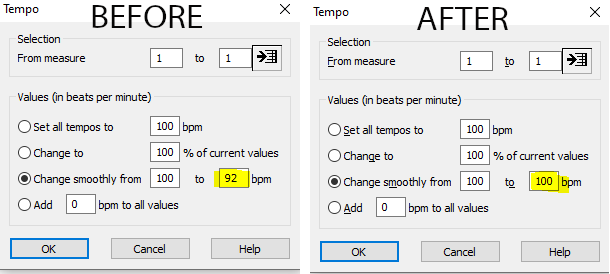
When I go to the Tempo popover [Measures/Tempo or Ctrl+Alt+Q] and set the tempo ‘Change smoothly from 100 to 92’ in this example and then I click OK, if I go right back in to the Tempo popover, it has changed the tempo in the 2nd box from 92 back to the default 100. Interestingly if I set the tempo to ‘Change smoothly from 92 to 100 bpm’ and click ‘OK’ and then go back in to the Tempo popover it will display ‘Change smoothly from 92 o 92’ – in both cases it resets the displayed tempo in the 2nd box to match the first one. Curiously, it will still perform correctly.
In this case as presented it’s a bug and a feature request: for the tempo changes inside a measure to be stored for any measure that it is used.

 .
.